img{ filter: alpha(opacity=75); moz-opacity:.75; opacity:.75; } img:hover{ -webkit-transition-duration: .5s; opacity: 1; -moz-opacity: 1; filter: alpha(opacity=100); } -->

♥快乐天堂 ♥

Pages

  • ♥Xiiao Ern简介♥
  • Home
  • ♥我和所有身边的人照照♥
  • ♥表情人物♥
  • ♥教程♥
多多关注我丫...不要来捣蛋哦^6^...不爽我就出去丫

Wednesday, 24 October 2012

GENTING~ing

好久没有写部落格了
 
因为学校考试和晚上要帮爸爸做工关系
 
今天星期三了
 
明天和后天 学校没有开课
 
爽捏!
 
不说这个了
 
那天跟老公去云顶
 
冷死我了捏...
 
幸好 有老公一直抱住我 ,牵着我的手 给我取暖,还有跑去startbucds
 
买了一杯又浓又香的咖啡 来保暖噢~
 
看到老公那么 温柔体贴 真的超级开心的
 
云顶那么冷,使我很想在哪里过夜玩玩噢
 
可是爸爸不给 所以没的过夜鲁
 
 
驾车到半路停住
就坐缆车上去噢 (上咯上咯~)
 
这个贪吃的老公啊~
真的是拿他没办法的...
拍照的时候都还在拿着burger
 
 
这个傻佬啊,一直在那里不动
可是噢 当你走过他前面噢
他会用他的拐杖打你屁屁哟~
 
去到 genting
当然没有少到 玩打保龄球
这是我们俩公婆的最爱哟~
 
 
走里面走到脚累了
所以 用命去玩
哈哈~冷死我了!(谁叫那些咖啡店 全部满人)
 
 
看到他可爱的样子
所以拍了下来噢
虽然头发怪怪点,因为他没有剪头发已经1个月了
 
 
今天就写到这里啦..的空的时候 再写噢...11月11日可能我们又再去云顶玩了噢~
有去的人...告诉我啦^^
 
BYBY


飞过鲁留个评论下来呗
Posted by Xiao Ern at 00:14 0 comments
Email ThisBlogThis!Share to XShare to FacebookShare to Pinterest

Friday, 13 July 2012

13/7

好久没有在这里写东西了,
最近都是比较懒惰写东西
因为心情不太好噢

在上个月,6月20多号
我有个姐妹生日噢


她就是我的姐妹...拿着蛋糕


这就是我和她


收礼物咯~ 嘻嘻


团体照...可是照片里没有我,因为没有人帮忙拍照

还有很多的...
就因为时间关系...
不分享了噢

不要气气丫

拜拜^^ 飞过鲁留个评论下来呗
Posted by Xiao Ern at 00:54 0 comments
Email ThisBlogThis!Share to XShare to FacebookShare to Pinterest

Thursday, 21 June 2012

生病了

生病了


已经病了好几天都还没好


好辛苦咯 


。。。


这个星期六就是萧泳姿生日了


好期待哦


到时候有


我,慧敏,欧阳,LSW,还有一些人(懒惰写了)


我到现在都还没想到要送她什么礼物


算啦...明天是星期五
跟宝贝去夜市 


顺便看看买什么礼物
(*^__^*) 嘻嘻……


准备去补习了


拜拜XD 飞过鲁留个评论下来呗
Posted by Xiao Ern at 04:35 0 comments
Email ThisBlogThis!Share to XShare to FacebookShare to Pinterest

Sunday, 3 June 2012

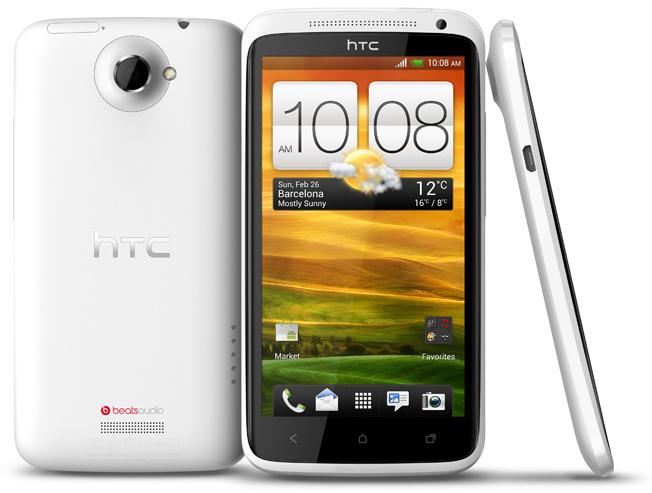
换了新电话...3/6

今天干爸爸来了

今天一整天都是喝starbucds
一整个下午就是只吃hamburger而已噢

可是幸好他来了。。。
下午还有机会吃mcdonald

没有什么吃的下
就是因为不舍得老公噢

让我最开心的事情
他买了一架电话给我><

就是


HTC

很美

本来我还想买

SUMSUNG GALAXY S3

结果还是没有了噢

所以他买给我的电话

我都是一样很喜欢噢^^

我的新生活就从今天开始了噢^^

等下晚上要去云顶了

BYBY 飞过鲁留个评论下来呗
Posted by Xiao Ern at 02:42 0 comments
Email ThisBlogThis!Share to XShare to FacebookShare to Pinterest

Saturday, 2 June 2012

3/6 night

心情超不好


哭了 好几轮
还是不太好


现在是晚上的
12:38 AM


也就是今天是星期日了
"他"要来了


他来了,我就麻烦大了


我不喜欢他
我反而更加恨他


为什么我会恨他
就是他!对我所做的事情


为了他!老公没来
父母对我的态度有所改变


伤心的我
要怎么去应付将来临的那5天呢? 


做工可以让我不注意他
可是
一旦。。。到了空闲的时间
就麻烦了


天。。。
我可以选择 时光倒流吗?
还是改变我的命运。。。不曾认识过他
家庭背景变得跟好吗?


我可以选择现在好好的哭一场吗?


谁。。。
了解我? 


谁。。。 
帮帮我?


心很不舒服


不知怎么做


睡不着
想老公


可是不能见面
还不是因为他!


干爸爸 。。。 干爸爸。。。
有那么重要吗?


我不在乎。。。
我只在乎
我的开心生活。。。


自由
在那里?


他走了。。。
或许我会更加开心!


飞过鲁留个评论下来呗
Posted by Xiao Ern at 09:45 0 comments
Email ThisBlogThis!Share to XShare to FacebookShare to Pinterest

Wednesday, 23 May 2012

假期鲁~~

明天我不去学校咯。。。
自己先放假 
哈哈


今天佩莹不来学校
她有信息跟我说
可是没有跟我说什么原因


今天在学校
发生了很多事情
我也不知怎么跟老公说
算吧。。。


早上。。。
丽明来了
我就一大早
就跟她说完我心事
她也了解我
到了perhimpunan,丽明竟然跟我说
(如果不介意,我可以做你的桶和你的开心果) 
我没听错吧?
我听到了
真的很开心
她对我很好


另外一件事情
在班上。。。
考试的时候


人家都没有说话
竟然帮我换了位置


还是风水不太好的地方
气死我了
热啊。。。。。。。。
很热很热。。。。


等啊等
等到。。。 
英语老师进来了


我才有机会偷偷
换回去我自己的位置噢


谢谢嘉园
谢谢欧阳
谢谢福贵


谢谢你们帮了我呀


接下来是
最生气的事情
就是就快放学了


一个两个男生欺负我
我很不开心
可是我也陪他们傻 


要在放学的时候
我给一个人捏!
好痛好痛。。。 
眼泪都流了下来
以后不敢在跟他玩了!  飞过鲁留个评论下来呗
Posted by Xiao Ern at 02:48 0 comments
Email ThisBlogThis!Share to XShare to FacebookShare to Pinterest

Monday, 21 May 2012

放帖子背景

很無聊對不、?來寫個教程 (:
很簡單;不會真的可以去撞牆了 !

首先;

設計 - edit html 

接著;使用 CTRL + F 尋找以下代碼
請使用 CTRL + C 複製

.post {

在以上代碼的下面放下以下代碼


這個是可以更換圖片背景

border:1px solid #cccccc;
padding:5px;
background:url(图片网址);

如果只要單單換顏色可以直接把以下代碼放進去 (:

border:1px solid #cccccc;
padding:5px;
 background: #ffffff ;

顏色代碼;請點擊以下鏈接嗯 :D

http://www.computerhope.com/htmcolor.htm
飞过鲁留个评论下来呗
Posted by Xiao Ern at 03:06 0 comments
Email ThisBlogThis!Share to XShare to FacebookShare to Pinterest

漂亮音乐播放器

請點擊 進入 音樂播放器網站

漂亮的Blog音樂播放器 - 點擊

很可愛的一個播放器嗯。迷你版 :D
我會覺得這個不錯用。直接開部落格就有舒服的音樂可以聽

首先。妳會看到以下圖片。
有三個選擇。當然。選妳喜歡的那一款就好了。

* 只能放一首歌曲。


下面這個圖;明顯可以看出。播放器類型。就是以上的圖 示範
背景色。 MP3 的網址 音量大小。自動播放。重複播放。
這些還需要為妳們解釋不 ? MP3 網址 哪裡拿 ?來。別緊張。 :) 往下看哈 !


提取 Mp3 網址。請點擊以下網址

http://mp3.sogou.com/

輸入妳要的歌曲。然後按搜索

就會看到很多歌曲;
如圖


* 看不到請點擊放大

看到紅色的框框不 ?Highline 複製網址。


如果看沒有鏈接網址。就點擊右鍵 下載歌曲。按 Copy Link Address :)

把網址放進 MP3 網此。
按 OK Button


請選擇 第二個框框的代碼。

把代碼放進 页面元素,添加小工具,HTML/javascript

完成 :) 祝妳成功 飞过鲁留个评论下来呗
Posted by Xiao Ern at 03:04 1 comments
Email ThisBlogThis!Share to XShare to FacebookShare to Pinterest

增加社交网络按钮

1. 去设计》页面元素》添加小工具》HTML/JAVASCRIPT....

把这些代码 paste 进去~

<center><a href="你的面子书profile网址"><img border="0" src="https://blogger.googleusercontent.com/img/b/R29vZ2xl/AVvXsEh_DNVxxEWL6fjY6AUwmAKydJjvmC5qyoiz4i7wiBldfn6A0IAgX5NzgjKOtUK9sq6J524i_3DlGN2e2l3OvmvvXFxuLr6wUP24e3a_H_89Rbw6rOPv43Oc3mea0hmqFSYVamcPYjM7Ny9f/s1600/c20_006.png" /></a>      <a href="你的twitter profile网址"><img border="0" src="https://blogger.googleusercontent.com/img/b/R29vZ2xl/AVvXsEiEWi4M1dgBrYu7b82L4u4bf8jsZkXdDjlujcA12EBrllj6RbRohQci2KDhyBLnGPrSpQ5Mu0e5G2Oaept_NLi3lMABgvgWb0IsEWEYb8gIc9yltb11KtJN4KFuiKcuVbKC8HkHvPRcJKnf/s1600/c20_017.png" /></a>     <a href="你的微博 profile网址"><img border="0" src="https://blogger.googleusercontent.com/img/b/R29vZ2xl/AVvXsEglR-sXLqS_ZO033E2TBgBCLJn-kHoRd5StacewR4O25MWpEmg53LYjqnfjBU7GLlW5KRs5O3hx71CnwWGnCJ4wvbd9da8U_Rk6yRFmSGV49owFuhqmrMUOdEmyXBU32jk_071vb28H6SNj/s1600/c20_018.png" /></a></center>

(代码中的按钮图片跟我的一样,如果不喜欢可以自己换掉 :) ) 

如果你没有微博和Twitter可以把它们代码删掉。
或者
如果你要添加其他社交网络的按钮可以添加以下代码

 <a href="社交网络profile网址"><img border="0" src="图片按钮网址" /></a>
飞过鲁留个评论下来呗
Posted by Xiao Ern at 02:59 0 comments
Email ThisBlogThis!Share to XShare to FacebookShare to Pinterest

放sidebar背景

这个教程不适合新模板用者。

有没有发现到我的sidebar是有放背景的?


1. 去设计》修改html ,按 Ctrl+F 找这些


.sidebar .widget, .main .widget {


2. 你会看到有一段的代码,如:

.sidebar .widget, .main .widget {
  border-bottom:1px dotted $bordercolor;
  margin:0 0 1.5em;
  padding:0 0 1.5em;
 }


把 , .main .widget  给删了,记得留下 {  符号。


3. 加入以下的代码:
background: url(图片url)


如图:

记得把图片url换成图片的网址啊...

保存起来即可 :D

-完-
飞过鲁留个评论下来呗
Posted by Xiao Ern at 02:56 0 comments
Email ThisBlogThis!Share to XShare to FacebookShare to Pinterest

Sunday, 20 May 2012

伤透了我

你
我不想怎么样了
我们
不在像以前那样
那么快乐
那么傻
那么坏


现在的我们
只是
陌生的朋友


大家见到就笑一笑
不需要去打招呼


你
为了‘’他‘’
伤透了我的心


我不在乎你怎么对我
我也不在乎你怎么看我
我也不在乎你怎么看我


因为
我学会了
原来
一个姐妹
一个朋友
对我来说


我还是选择
朋友


现在
你不是
她们是了


虽然有时候她们不太理我
可是
她们表面上
是对我很好的


你
什么都没有
在同一个位子
同一个班级
同一个时间上课及下课和放学


大家也不需要担心什么


你有你的自由
我有我的自由


大家各走各


你变了


大家看不到
只有我


看得到


。。。。 飞过鲁留个评论下来呗
Posted by Xiao Ern at 23:51 0 comments
Email ThisBlogThis!Share to XShare to FacebookShare to Pinterest

Saturday, 19 May 2012

如何增加飘落音符

喜欢音乐的朋友们注意啦!这是飘落音符的 code。同时有多种音符一起飘落的哦。

到 Design > Add a Gadget > HTML/Java Script 把以下的 code copy and paste 进去,按 save 就好了哦!:)

你们喜欢什么颜色的音符?欢迎留言告诉我,有时间的话我帮你们弄。希望你们会喜欢!

这个是浅色系飘落音符的 code (适合用在暗色背景)


<marquee behavior="scroll" direction="down" scrollamount="5" style="position:absolute; left:130px; top:150px; width:16px; height:548px;"><span style="color: #F6CECE;">♪</span></marquee> <marquee behavior="scroll" direction="down" scrollamount="3" style="position:absolute; left:177px; top:170px; width:16px; height:388px;"><span style="color: #F6CEE3;">♫</span></marquee> <marquee behavior="scroll" direction="down" scrollamount="5" style="position:absolute; left:225px; top:190px; width:16px; height:324px;"><span style="color: #CEF6E3;">♪</span></marquee> <marquee behavior="scroll" direction="down" scrollamount="5" style="position:absolute; left:265px; top:180px; width:16px; height:499px;"><span style="color: #F7F8E0;">♭</span></marquee>  <marquee behavior="scroll" direction="down" scrollamount="5" style="position:absolute; left:325px; top:160px; width:16px; height:411px;"><span style="color: #A9F5A9;">♫</span></marquee><marquee behavior="scroll" direction="down" scrollamount="5" style="position:absolute; left:239px; top:190px; width:16px; height:251px;"><span style="color: #E0E0F8;">♭</span></marquee><marquee behavior="scroll" direction="down" scrollamount="1" style="position:absolute; left:141px; top:150px; width:16px; height:221px;"><span style="color: #F7BE81;">♪</span></marquee><marquee behavior="scroll" direction="down" scrollamount="7" style="position:absolute; left:289px; top:170px; width:16px; height:230px;"><span style="color: #F6CEF5;">♬</span></marquee> <marquee behavior="scroll" direction="down" scrollamount="5" style="position:absolute; left:108px; top:230px; width:16px; height:241px;"><span style="color: #E3CEF6;">♫</span></marquee> <marquee behavior="scroll" direction="down" scrollamount="2" style="position:absolute; left:370px; top:190px; width:16px; height:386px;"><span style="color: #A9F5D0;">♭</span></marquee> <marquee behavior="scroll" direction="down" scrollamount="2" style="position:absolute; left:394px; top:150px; width:16px; height:484px;"><span style="color: #F6E3CE;">♫</span></marquee> <marquee behavior="scroll" direction="down" scrollamount="2" style="position:absolute; left:430px; top:170px; width:16px; height:442px;"><span style="color: #D0F5A9;">♬</span></marquee><marquee behavior="scroll" direction="down" scrollamount="3" style="position:absolute; left:475px; top:200px; width:16px; height:423px;"><span style="color: #A9A9F5;">♪</span></marquee> <marquee behavior="scroll" direction="down" scrollamount="6" style="position:absolute; left:559px; top:170px; width:16px; height:541px;"><span style="color: #A9F5D0;">♫</span></marquee><marquee behavior="scroll" direction="down" scrollamount="2" style="position:absolute; left:580px; top:200px; width:16px; height:423px;"><span style="color: #D0F5A9;">♫</span></marquee><marquee behavior="scroll" direction="down" scrollamount="5" style="position:absolute; left:533px; top:170px; width:16px; height:385px;"><span style="color: #A9A9F5;">♬</span></marquee><marquee behavior="scroll" direction="down" scrollamount="1" style="position:absolute; left:614px; top:200px; width:16px; height:332px;"><span style="color: #F6E3CE;">♭</span></marquee><marquee behavior="scroll" direction="down" scrollamount="3" style="position:absolute; left:651px; top:250px; width:16px; height:386px;"><span style="color: #BEF781;">♬</span></marquee><marquee behavior="scroll" direction="down" scrollamount="5" style="position:absolute; left:684px; top:290px; width:16px; height:514px;"><span style="color: #F8E0E0;">♫</span></marquee><marquee behavior="scroll" direction="down" scrollamount="1" style="position:absolute; left:658px; top:180px; width:16px; height:247px;"><span style="color: #F6CECE;">♭</span></marquee><marquee behavior="scroll" direction="down" scrollamount="1" style="position:absolute; left:694px; top:160px; width:16px; height:216px;"><span style="color: #F8E0E0;">♪</span></marquee><marquee behavior="scroll" direction="down" scrollamount="2" style="position:absolute; left:738px; top:200px; width:16px; height:392px;"><span style="color: #003399;">♬</span></marquee><marquee behavior="scroll" direction="down" scrollamount="1" style="position:absolute; left:753px; top:150px; width:16px; height:544px;"><span style="color: #D0F5A9;">♭</span></marquee><marquee behavior="scroll" direction="down" scrollamount="5" style="position:absolute; left:800px; top:180px; width:16px; height:404px;"><span style="color: #F8E0E0;">♪</span></marquee>


这个是纯粉红色飘落音符的 code:
<marquee behavior="scroll" direction="down" scrollamount="5" style="position:absolute; left:130px; top:150px; width:16px; height:1000px;"><span style="color: #F5A9A9;">♪</span></marquee><marquee behavior="scroll" direction="down" scrollamount="3" style="position:absolute; left:177px; top:170px; width:16px; height:1000px;"><span style="color: #F5A9A9;">♫</span></marquee><marquee behavior="scroll" direction="down" scrollamount="5" style="position:absolute; left:225px; top:190px; width:16px; height:1000px;"><span style="color: #F5A9A9;">♪</span></marquee><marquee behavior="scroll" direction="down" scrollamount="5" style="position:absolute; left:265px; top:180px; width:16px; height:800px;"><span style="color: #F5A9A9;">♭</span></marquee><marquee behavior="scroll" direction="down" scrollamount="5" style="position:absolute; left:325px; top:160px; width:16px; height:900px;"><span style="color: #F5A9A9;">♫</span></marquee><marquee behavior="scroll" direction="down" scrollamount="5" style="position:absolute; left:239px; top:190px; width:16px; height:1051px;"><span style="color: #F5A9A9;">♭</span></marquee><marquee behavior="scroll" direction="down" scrollamount="1" style="position:absolute; left:141px; top:150px; width:16px; height:1221px;"><span style="color: #F5A9A9;">♪</span></marquee><marquee behavior="scroll" direction="down" scrollamount="7" style="position:absolute; left:289px; top:170px; width:16px; height:1230px;"><span style="color: #F5A9A9;">♬</span></marquee><marquee behavior="scroll" direction="down" scrollamount="5" style="position:absolute; left:108px; top:230px; width:16px; height:1241px;"><span style="color: #F5A9A9;">♫</span></marquee><marquee behavior="scroll" direction="down" scrollamount="2" style="position:absolute; left:370px; top:190px; width:16px; height:1386px;"><span style="color: #F5A9A9;">♭</span></marquee><marquee behavior="scroll" direction="down" scrollamount="2" style="position:absolute; left:394px; top:150px; width:16px; height:1084px;"><span style="color: #F5A9A9;">♫</span></marquee><marquee behavior="scroll" direction="down" scrollamount="2" style="position:absolute; left:430px; top:170px; width:16px; height:742px;"><span style="color: #F5A9A9;">♬</span></marquee><marquee behavior="scroll" direction="down" scrollamount="3" style="position:absolute; left:475px; top:200px; width:16px; height:1423px;"><span style="color: #F5A9A9;">♪</span></marquee><marquee behavior="scroll" direction="down" scrollamount="6" style="position:absolute; left:559px; top:170px; width:16px; height:1541px;"><span style="color: #F5A9A9;">♫</span></marquee><marquee behavior="scroll" direction="down" scrollamount="2" style="position:absolute; left:580px; top:200px; width:16px; height:1423px;"><span style="color: #F5A9A9;">♫</span></marquee><marquee behavior="scroll" direction="down" scrollamount="5" style="position:absolute; left:533px; top:170px; width:16px; height:385px;"><span style="color: #F5A9A9;">♬</span></marquee><marquee behavior="scroll" direction="down" scrollamount="1" style="position:absolute; left:614px; top:200px; width:16px; height:1332px;"><span style="color: #F5A9A9;">♭</span></marquee><marquee behavior="scroll" direction="down" scrollamount="3" style="position:absolute; left:651px; top:250px; width:16px; height:1386px;"><span style="color: #F5A9A9;">♬</span></marquee><marquee behavior="scroll" direction="down" scrollamount="5" style="position:absolute; left:684px; top:290px; width:16px; height:1514px;"><span style="color: #F5A9A9;">♫</span></marquee><marquee behavior="scroll" direction="down" scrollamount="1" style="position:absolute; left:658px; top:180px; width:16px; height:1247px;"><span style="color: #F5A9A9;">♭</span></marquee><marquee behavior="scroll" direction="down" scrollamount="1" style="position:absolute; left:694px; top:160px; width:16px; height:1216px;"><span style="color: #F5A9A9;">♪</span></marquee><marquee behavior="scroll" direction="down" scrollamount="2" style="position:absolute; left:738px; top:200px; width:16px; height:1392px;"><span style="color: #F5A9A9;">♬</span></marquee><marquee behavior="scroll" direction="down" scrollamount="10" style="position:absolute; left:753px; top:150px; width:16px; height:1544px;"><span style="color: #F5A9A9;">♭</span></marquee><marquee behavior="scroll" direction="down" scrollamount="5" style="position:absolute; left:800px; top:180px; width:16px; height:750px;"><span style="color: #F5A9A9;">♪</span></marquee> 飞过鲁留个评论下来呗
Posted by Xiao Ern at 04:19 0 comments
Email ThisBlogThis!Share to XShare to FacebookShare to Pinterest

Friday, 18 May 2012

模糊or清晰图片在鼠标指向后的转变


注意上图的黑色鼠标,就是原本模糊or清晰的图片在鼠标指向后变成清晰or模糊

第一步骤
登入博客 - 信息中心 - 设计 - 修改HTML

CTRL+F 找 ]]></b:skin>


第二步骤
在 ]]></b:skin> 上面 添加以下 一款代码
第一款:清晰图片在鼠标指向后变成模糊图片

img{
opacity: 1;
-moz-opacity: 1;
filter: alpha(opacity=100);
}

img:hover{
-webkit-transition-duration: .5s;
filter: alpha(opacity=75);
moz-opacity:.75;
opacity:.75;
}
第二款:模糊图片在鼠标指向后变清晰图片

img{
filter: alpha(opacity=75);
moz-opacity:.75;
opacity:.75;
}
img:hover{
-webkit-transition-duration: .5s;
opacity: 1;
-moz-opacity: 1;
filter: alpha(opacity=100);
}

添加了后就会像下图红框。
预览+保存模板。


by :copy 
飞过鲁留个评论下来呗
Posted by Xiao Ern at 03:44 0 comments
Email ThisBlogThis!Share to XShare to FacebookShare to Pinterest

连接开在新窗口


[此教程支持新旧模板]


1. 去设计》页面元素》添加小工具》HTML/JAVASCRIPT....

把以下代码 paste 进去 ↓

<!-- code for turning all non-blog links to new page links -->
    <script type="text/javascript" language="javascript">
       var arr = document.getElementsByTagName("a");  //get all links in the page
       for(var i = 0; i < arr.length; i++)
       {
          if(arr[i].href.indexOf("Your URL") < 0 //not links that are 'inside' blog
             && arr[i].href.indexOf("javascript:") < 0) //not javascript links
             arr[i].target = "_blank";
       }
    </script>

保存起来即可 :D

很简单吧?  飞过鲁留个评论下来呗
Posted by Xiao Ern at 03:41 0 comments
Email ThisBlogThis!Share to XShare to FacebookShare to Pinterest

增加back to top按钮


1. 首先,去设计>修改HTML 按 Ctrl+F 找

</body> 

2. 在它的前面 paste 这些:
 <a href='#' style='display:scroll;position:fixed;bottom:5px;right:5px;' title='Back to Top'><img src='图片url'/></a> 


如图:


3. 按保存模板就完成了


之前我有提供一些back to top图片,如果你没有图片放可以放那些。


飞过鲁留个评论下来呗
Posted by Xiao Ern at 03:39 0 comments
Email ThisBlogThis!Share to XShare to FacebookShare to Pinterest
Newer Posts Older Posts Home
Subscribe to: Comments (Atom)

现在的我哟

现在的我哟


Ern Xiiao

Create Your Badge

Followers

Blog Archive

  • ▼  2012 (51)
    • ▼  October (1)
      • GENTING~ing
    • ►  July (1)
      • 13/7
    • ►  June (3)
      • 生病了
      • 换了新电话...3/6
      • 3/6 night
    • ►  May (34)
      • 假期鲁~~
      • 放帖子背景
      • 漂亮音乐播放器
      • 增加社交网络按钮
      • 放sidebar背景
      • 伤透了我
      • 如何增加飘落音符
      • 模糊or清晰图片在鼠标指向后的转变
      • 连接开在新窗口
      • 增加back to top按钮
    • ►  April (5)
    • ►  March (7)

MusicPlaylist
Music Playlist at MixPod.com
Travel theme. Powered by Blogger.